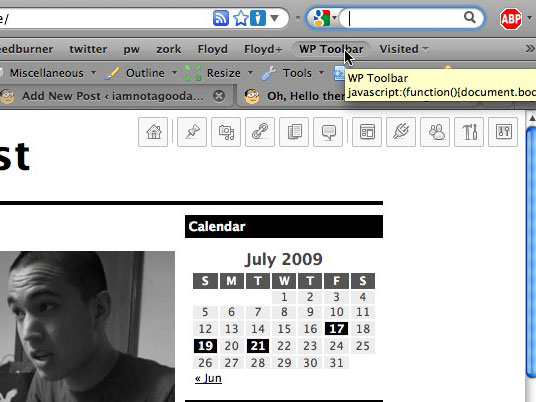
WordPress Admin Toolbar Bookmarklet
Jul 23 2009

Bookmark this and/or drag it into your bookmark toolbar:
What it is:
A JavaScript bookmarklet for WordPress site administrators and designers.
What it does:
Using jQuery, it appends the default WordPress admin menu to whatever page you’re currently on and styles it with CSS, fixing it to the top right corner. Assuming you’re on a site that’s running WordPress (and it’s installed in the domain’s root), you now have instant access to the entire administrative back end (sans any pages from custom plugins, etc) from the front end.
To remove the the toolbar menu, just re-click the bookmarklet, ad infinitum.
What it doesn’t do:
It does not give you access to anything you wouldn’t already have. If you use it on this site, for example, you’ll still have to log in. Also, if the site doesn’t run on WP, you’ll get a whole mess of 404s.
Made using the menu from the most recent WordPress release, 2.8. Tested with FireFox and Safari on Mac. Not tested with IE or Windows. Feedback appreciated.
[EDIT 3/3/10] Hendrik from Germany has made a GreaseMonkey script that automatically loads my WP toolbar when on a specific site. Pretty cool.
http://www.kulturbolschewismus.de/2010/03/03/wordpress-admin-toolbar/
(or translated into English)


July 25th, 2009 at 7:32 pm
WordPress Admin Toolbar Bookmarklet…
A JavaScript bookmarklet for WordPress site administrators and designers that superficially appends the WP admin menu to the current page, allowing instant access to the whole WP backend from the frontend.
…
October 31st, 2009 at 2:44 pm
Hooray! Hooray! Hooray! Beautiful and it works. Great combination! Is there a way to have the script access to the current page id so that when I click “Pages : edit” it takes me right to the editor for the page I’m on?
October 31st, 2009 at 5:15 pm
@ anon
Thanks! No, there’s not really a consistent way to do that; WP themes can tag posts with the ID in any number of ways, if they even do at all. Good thought, though.
March 2nd, 2010 at 12:12 am
[...] WordPress Admin Toolbar Bookmarklet [via @smashingmag] (No Ratings Yet) Loading … Tags: WordPress Tools Visited 4 times, 4 so far today [...]
March 2nd, 2010 at 12:12 am
Wow… its a great script buddy… Cant you add one more button like [hide] or [close] ?? It wud be a nice addition.. and as the 2nd commenter – Anonymous said cant you add the ability to post the content of the current site??
Actually as you might know wordpress provides the script right? cant you just add it with a sleek new button?
BTW, the post to blog script :
javascript:var d=document,w=window,e=w.getSelection,k=d.getSelection,x=d.selection,s=(e?e():(k)?k():(x?x.createRange().text:0)),f='http://www.josephilipraja.com/myworld/wp-admin/press-this.php',l=d.location,e=encodeURIComponent,u=f+'?u='+e(l.href)+'&t='+e(d.title)+'&s='+e(s)+'&v=4';a=function(){if(!w.open(u,'t','toolbar=0,resizable=1,scrollbars=1,status=1,width=720,height=570'))l.href=u;};if (/Firefox/.test(navigator.userAgent)) setTimeout(a, 0); else a();void(0)March 2nd, 2010 at 12:17 am
Oops.. am sorry…. I mis understood the script!… I thought its a toolbar that would work with all the sites.. my mistake… sorry.. ;) :P
Anyway this one is another great idea… cool.. I like it.. :D
March 2nd, 2010 at 12:59 am
This works great. Thank you for your efforts.
March 2nd, 2010 at 1:53 am
Excellent idea / implemenation.
One thing is that many WP sites already have jQuery loaded up, so make the googleapi loading of jQuery conditional ?
:)
March 2nd, 2010 at 2:07 am
That´s a really good idea!!! Greets, partner, I ´ll test in IE and I´ll tell you if its works allright or not.
I usually make all my new sites for best results at Google SERPs with Wordpress and I think that your bookmarklet its really useful for this objetive.
Thanks a lot and see you soon!!!
PD: Sorry about my poor english, I´m from Spain and my grammar is a little bit rusty ;-)
March 2nd, 2010 at 3:57 am
PRetty neat idea.
March 2nd, 2010 at 4:05 am
Hi,
how can i use it with a wp blog which is not placed in the root dir.?
Jochen
March 2nd, 2010 at 4:35 am
This makes things alot easier. A bookmarklet just for your wordpress powered blog. Just amazing. Let me test it out.
March 2nd, 2010 at 6:34 am
[...] fejlesztő weboldala itt érhető [...]
March 2nd, 2010 at 8:59 am
Nice thanks, would it be possible to create another menu that lists your blog and auto logs into them? that would be a cool addition.
March 2nd, 2010 at 9:48 am
Sometimes the simple ideas are the best, I LIKE IT, thankyou
March 2nd, 2010 at 10:16 am
@ Mr.JOSE
To hide the toolbar, just reclick the bookmarklet. I’ll make that a little clearer in the blog post. (I think you figured out that your other suggestion couldn’t really apply to this bookmarklet, but thanks for the advice.)
@ SD
That’s actually a good suggestion. Maybe for the next version, eh?
@ jochen
That functionality would require custom values for each individual circumstance, thus no support for it. Feel free to take a look at the JS/CSS (you can find it if you look for it) and make/host your own version.
March 2nd, 2010 at 12:23 pm
This looks like basically the most awesome thing ever. Anyone try this in Google Chrome for a mac? I’ve been phasing out safari, too slow.
March 2nd, 2010 at 2:08 pm
[...] WordPress Admin Toolbar Bookmarklet [via @smashingmag] [...]
March 2nd, 2010 at 3:29 pm
What if the WP blog is in a subdomain (mysite.com/blog/)?
Doesn’t seem to work; since it keep trying to access the top-level.
March 2nd, 2010 at 3:35 pm
@ knowlimit
That’s not a subdomain. That’s a folder. See above.
March 2nd, 2010 at 5:02 pm
[...] can find out more over here – at the very least, it’s a very nice implementation of [...]
March 2nd, 2010 at 7:31 pm
Why I only found this today, I don’t know, but suffice to say that you’ve already earned a spot in my heart. I’ve also included this bookmarklet in Quix’s default command set, under the command ‘wptool’ :)
March 2nd, 2010 at 7:33 pm
Also works great with Crome for the Mac. Thanks!
March 2nd, 2010 at 7:36 pm
What a neat little tool. I have just started using this for my leadership and team collaboration blog and have found it to be a big help. I am currently using WordPress 2.9.2 and it works with seamlessly. Thanks again!
March 2nd, 2010 at 9:41 pm
We tremble before your awesomeness. Too cool for school.
March 2nd, 2010 at 10:43 pm
[...] 插件没有下载地址,需要测试的可以访问:http://iamnotagoodartist.com/other/wordpress-admin-toolbar-bookmarklet/ [...]
March 2nd, 2010 at 11:56 pm
Works fine on Chrome for Linux.
Thanks!
March 3rd, 2010 at 4:57 am
[...] aktuellen URL, die ihr gerade besucht. So habt ihr immer alle nötigen Links auf die Schnelle. [via] Wenn du hier neu bist, dann abonniere am besten den RSS-Feed um auf dem Laufenden zu bleiben. [...]
March 3rd, 2010 at 5:07 am
[...] 3rd, 2010 · No Comments WordPress Admin Toolbar Bookmarklet – Other – iamnotagoodartist A JavaScript bookmarklet for WordPress site administrators and designers. What it does: Using [...]
March 3rd, 2010 at 5:08 pm
really handy, thanks! I’ll use this so much I’ll wear it out.
March 5th, 2010 at 4:37 am
[...] found an interesting tool from IAmNotAGoodArtist.com and thought I would share this with [...]
March 5th, 2010 at 7:08 am
Wow, tolles Teil! Echt praktisch.
March 6th, 2010 at 10:12 am
[...] (yerimi) bahsetmek istiyorum kısaca. Bookmarklet’in orjinal sayfasına bu linkten ulaşabilirsiniz. Bookmarklet’i hazırlayan Tommy‘e ulaştım ve bookmarklet’i [...]
March 6th, 2010 at 4:29 pm
[...] محبوبیت سیستم مدیریت محتوی وردپرس به دلایل ویژگی های منحصر به فردی هست که این سیستم در بطنش داره. از لذت توسعه اون گرفته تا برآورده کردن نیاز کاربران مبتدی این سیستم سراسر جذاب و پویا و به اعتقاد من استاندارد هست. این بار من قصد دارم تا یکی از کشفیاتم خودم رو در حین وبگردی به شما همراهان معرفی کنم. اون چیزی نیست جز Admin Toolbar Bookmarklet. [...]
March 9th, 2010 at 6:04 pm
[...] WordPress Admin Toolbar Bookmarklet – Other – iamnotagoodartist (tags: bookmarklet wordpress) [...]
March 11th, 2010 at 4:09 am
[...] WordPress Admin Toolbar Bookmarklet [via @smashingmag] [...]