WordPress Admin Toolbar Bookmarklet
Jul 23 2009

Bookmark this and/or drag it into your bookmark toolbar:
What it is
A JavaScript bookmarklet for WordPress site administrators and designers.
What it does:
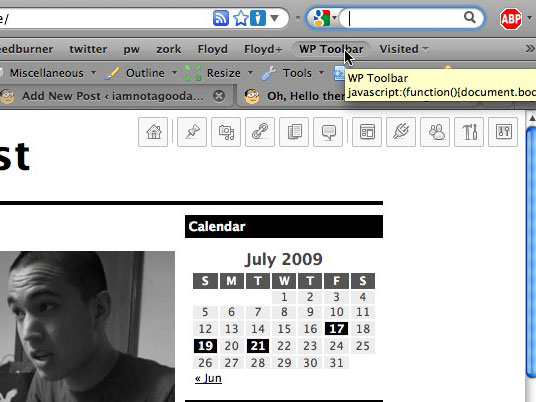
Using jQuery, it appends the default WordPress admin menu to whatever page you’re currently on and styles it with CSS, fixing it to the top right corner. Assuming you’re on a site that’s running WordPress (and it’s installed in the domain’s root), you now have instant access to the entire administrative back end (sans any pages from custom plugins, etc) from the front end.
To remove the the toolbar menu, just re-click the bookmarklet, ad infinitum.
What it doesn’t do
It does not give you access to anything you wouldn’t already have. If you use it on this site, for example, you’ll still have to log in. Also, if the site doesn’t run on WP, you’ll get a whole mess of 404s.
Made using the menu from the most recent WordPress release, 2.8. Tested with FireFox and Safari on Mac. Not tested with IE or Windows. Feedback appreciated.
Updates
GreaseMonkey script (3/3/10)
Hendrik from Germany has made a GreaseMonkey script that automatically loads my WP toolbar when on a specific site. Pretty cool.
http://www.kulturbolschewismus.de/2010/03/03/wordpress-admin-toolbar/
(or translated into English)
Support for folder’d WP and some CSS/JS fixes (3/19/10)
By popular request, I have now added support for WordPress installations not in the root folder. Here’s the bookmarklet for that:
After you’ve dragged it into your bookmarks toolbar, replace the two instances of FOLDERNAME with the name of your folder. Old bookmarklets without this new variable will continue to work.
I’ve also fixed some minor CSS positioning things and made it check for jQuery before loading it… so it should look nicer and be faster!
Safari Extension (6/19/10)
Dan Schointuch of Semimagic ported my bookmarklet into a native Safari extension. Pretty cool. Read his blog post or get the source on GitHub.


July 25th, 2009 at 7:32 pm
WordPress Admin Toolbar Bookmarklet…
A JavaScript bookmarklet for WordPress site administrators and designers that superficially appends the WP admin menu to the current page, allowing instant access to the whole WP backend from the frontend.
…
October 31st, 2009 at 2:44 pm
Hooray! Hooray! Hooray! Beautiful and it works. Great combination! Is there a way to have the script access to the current page id so that when I click “Pages : edit” it takes me right to the editor for the page I’m on?
October 31st, 2009 at 5:15 pm
@ anon
Thanks! No, there’s not really a consistent way to do that; WP themes can tag posts with the ID in any number of ways, if they even do at all. Good thought, though.
March 2nd, 2010 at 12:12 am
[...] WordPress Admin Toolbar Bookmarklet [via @smashingmag] (No Ratings Yet) Loading … Tags: WordPress Tools Visited 4 times, 4 so far today [...]
March 2nd, 2010 at 12:12 am
Wow… its a great script buddy… Cant you add one more button like [hide] or [close] ?? It wud be a nice addition.. and as the 2nd commenter – Anonymous said cant you add the ability to post the content of the current site??
Actually as you might know wordpress provides the script right? cant you just add it with a sleek new button?
BTW, the post to blog script :
javascript:var d=document,w=window,e=w.getSelection,k=d.getSelection,x=d.selection,s=(e?e():(k)?k():(x?x.createRange().text:0)),f='http://www.josephilipraja.com/myworld/wp-admin/press-this.php',l=d.location,e=encodeURIComponent,u=f+'?u='+e(l.href)+'&t='+e(d.title)+'&s='+e(s)+'&v=4';a=function(){if(!w.open(u,'t','toolbar=0,resizable=1,scrollbars=1,status=1,width=720,height=570'))l.href=u;};if (/Firefox/.test(navigator.userAgent)) setTimeout(a, 0); else a();void(0)March 2nd, 2010 at 12:17 am
Oops.. am sorry…. I mis understood the script!… I thought its a toolbar that would work with all the sites.. my mistake… sorry.. ;) :P
Anyway this one is another great idea… cool.. I like it.. :D
March 2nd, 2010 at 12:59 am
This works great. Thank you for your efforts.
March 2nd, 2010 at 1:53 am
Excellent idea / implemenation.
One thing is that many WP sites already have jQuery loaded up, so make the googleapi loading of jQuery conditional ?
:)
March 2nd, 2010 at 2:07 am
That´s a really good idea!!! Greets, partner, I ´ll test in IE and I´ll tell you if its works allright or not.
I usually make all my new sites for best results at Google SERPs with WordPress and I think that your bookmarklet its really useful for this objetive.
Thanks a lot and see you soon!!!
PD: Sorry about my poor english, I´m from Spain and my grammar is a little bit rusty ;-)
March 2nd, 2010 at 3:57 am
PRetty neat idea.
March 2nd, 2010 at 4:05 am
Hi,
how can i use it with a wp blog which is not placed in the root dir.?
Jochen
March 2nd, 2010 at 4:35 am
This makes things alot easier. A bookmarklet just for your wordpress powered blog. Just amazing. Let me test it out.
March 2nd, 2010 at 6:34 am
[...] fejlesztő weboldala itt érhető [...]
March 2nd, 2010 at 8:59 am
Nice thanks, would it be possible to create another menu that lists your blog and auto logs into them? that would be a cool addition.
March 2nd, 2010 at 9:48 am
Sometimes the simple ideas are the best, I LIKE IT, thankyou
March 2nd, 2010 at 10:16 am
@ Mr.JOSE
To hide the toolbar, just reclick the bookmarklet. I’ll make that a little clearer in the blog post. (I think you figured out that your other suggestion couldn’t really apply to this bookmarklet, but thanks for the advice.)
@ SD
That’s actually a good suggestion. Maybe for the next version, eh?
@ jochen
That functionality would require custom values for each individual circumstance, thus no support for it. Feel free to take a look at the JS/CSS (you can find it if you look for it) and make/host your own version.
March 2nd, 2010 at 12:23 pm
This looks like basically the most awesome thing ever. Anyone try this in Google Chrome for a mac? I’ve been phasing out safari, too slow.
March 2nd, 2010 at 2:08 pm
[...] WordPress Admin Toolbar Bookmarklet [via @smashingmag] [...]
March 2nd, 2010 at 3:29 pm
What if the WP blog is in a subdomain (mysite.com/blog/)?
Doesn’t seem to work; since it keep trying to access the top-level.
March 2nd, 2010 at 3:35 pm
@ knowlimit
That’s not a subdomain. That’s a folder. See above.
March 2nd, 2010 at 5:02 pm
[...] can find out more over here – at the very least, it’s a very nice implementation of [...]
March 2nd, 2010 at 7:31 pm
Why I only found this today, I don’t know, but suffice to say that you’ve already earned a spot in my heart. I’ve also included this bookmarklet in Quix‘s default command set, under the command ‘wptool’ :)
March 2nd, 2010 at 7:33 pm
Also works great with Crome for the Mac. Thanks!
March 2nd, 2010 at 7:36 pm
What a neat little tool. I have just started using this for my leadership and team collaboration blog and have found it to be a big help. I am currently using WordPress 2.9.2 and it works with seamlessly. Thanks again!
March 2nd, 2010 at 9:41 pm
We tremble before your awesomeness. Too cool for school.
March 2nd, 2010 at 10:43 pm
[...] 插件没有下载地址,需要测试的可以访问:http://iamnotagoodartist.com/other/wordpress-admin-toolbar-bookmarklet/ [...]
March 2nd, 2010 at 11:56 pm
Works fine on Chrome for Linux.
Thanks!
March 3rd, 2010 at 4:57 am
[...] aktuellen URL, die ihr gerade besucht. So habt ihr immer alle nötigen Links auf die Schnelle. [via] Wenn du hier neu bist, dann abonniere am besten den RSS-Feed um auf dem Laufenden zu bleiben. [...]
March 3rd, 2010 at 5:07 am
[...] 3rd, 2010 · No Comments WordPress Admin Toolbar Bookmarklet – Other – iamnotagoodartist A JavaScript bookmarklet for WordPress site administrators and designers. What it does: Using [...]
March 3rd, 2010 at 5:08 pm
really handy, thanks! I’ll use this so much I’ll wear it out.
March 5th, 2010 at 4:37 am
[...] found an interesting tool from IAmNotAGoodArtist.com and thought I would share this with [...]
March 5th, 2010 at 7:08 am
Wow, tolles Teil! Echt praktisch.
March 6th, 2010 at 10:12 am
[...] (yerimi) bahsetmek istiyorum kısaca. Bookmarklet’in orjinal sayfasına bu linkten ulaşabilirsiniz. Bookmarklet’i hazırlayan Tommy‘e ulaştım ve bookmarklet’i [...]
March 6th, 2010 at 4:29 pm
[...] محبوبیت سیستم مدیریت محتوی وردپرس به دلایل ویژگی های منحصر به فردی هست که این سیستم در بطنش داره. از لذت توسعه اون گرفته تا برآورده کردن نیاز کاربران مبتدی این سیستم سراسر جذاب و پویا و به اعتقاد من استاندارد هست. این بار من قصد دارم تا یکی از کشفیاتم خودم رو در حین وبگردی به شما همراهان معرفی کنم. اون چیزی نیست جز Admin Toolbar Bookmarklet. [...]
March 9th, 2010 at 6:04 pm
[...] WordPress Admin Toolbar Bookmarklet – Other – iamnotagoodartist (tags: bookmarklet wordpress) [...]
March 11th, 2010 at 4:09 am
[...] WordPress Admin Toolbar Bookmarklet [via @smashingmag] [...]
March 18th, 2010 at 10:37 am
It’s too bad this tool doesn’t work with sites that aren’t installed in the root – all of my sites are installed in a subdirectory. It looks like a really cool function.
March 18th, 2010 at 10:44 am
I agree that it need’s an other-than-Root option.
How a quick “ask” window:
WordPress Directory:
__ Root
__ Other: __________
Submit
March 18th, 2010 at 3:12 pm
Also easy to add to (for example) a footer with something like:
<?php
if ( is_user_logged_in() ) {
echo '<a href=”//yourdomain.com/location/wptoolbar.js\’;})();” rel=”nofollow”>WP Toolbar</a>’;
};
?>
Assuming you’ve grabbed the JS, CSS and graphics, of course.
Must be a way to make a plugin to do all this. Says the guy who has never made a plugin OR learned JQuery.
Maybe it’s time to start.
March 18th, 2010 at 3:13 pm
Oops, code didn’t work. Sorry. But you get the idea. If I could figure it out, you can.
March 18th, 2010 at 3:21 pm
@ Jim
Fixed that link code. (You wanted to use HTML entities instead of < and >!)
As for that plugin, everyone, feel free to have at it. Check the bookmarklet’s link for the proper loading JS and follow its URL to grab the JS itself.
March 18th, 2010 at 3:47 pm
Like Dalton, all my WP installations are not installed at the root level of my domains, therefore this handy-dandy script will not work. :(
March 19th, 2010 at 1:06 pm
@ jochen, knowlimit, Dalton, Jim, Travis Quinnelly
Support for folders added!
@ SD
It’s conditional now!
Thanks for all the support and suggestions, guys and gals.
March 29th, 2010 at 3:32 am
[...] WordPress 各个菜单呢?我们可以使用 WordPress Admin Toolbar Bookmarklet 来实现快捷访问 WordPress 后台管理菜单。WordPress Admin Toolbar Bookmarklet [...]
March 30th, 2010 at 2:12 am
[...] WordPress Admin Toolbar Bookmarklet [...]
April 7th, 2010 at 11:48 am
Would you consider augmenting this so that it works with WPMU (subdirectory install)? Currently, the bookmarklet always shows the main blog menu. It would be nice if it could know if the person is looking at a sub-blog and show its menu. I think this would mean changing the links from /wp-admin/… to something else.
April 7th, 2010 at 12:02 pm
The FOLDERNAME bookmarklet helps… but it would be cool if the bookmarklet could work with a dynamic foldername, and set it automatically.
April 9th, 2010 at 12:56 pm
[...] Open a WordPress Toolbar. [...]
April 10th, 2010 at 1:23 am
[...] Pagina oficiala WP-Toolbar Related Posts :Teme/Plugin-uri WordPress pentru mobil (4) – WP ViewMobileUna dintre cele mai simple plugin-uri WordPress pentru vizionarea continutului de pe mobil este …Instalare locala WordPress prin WAMP Inainte de a va apuca de modificari ale fisierelor "php" din WordPress, va recomand sa desca … [...]
April 13th, 2010 at 3:27 pm
Thank you, Tommy, for the great tool. I’ve updated the code to work for WordPress MU and presumably the way multi-platform WordPress 3.0 will work as well. It assumes you’re working on the following directory structure: http://www.domain.com/subblog/path/to/more
Just minify below for the bookmarklet:
javascript:(function(){
var a=document.location.href;
var b=’http://wptoolbar.iamnotagoodartist.com/wptoolbar.js’;
var c=a.replace(/^http:\/\/[^\/]+(\/(\w+))\/.*$/,’$2′);
if (c!=a) {b+=’?f=’+c;}
document.body.appendChild(document.createElement(‘script’)).src=b;
})();
April 27th, 2010 at 8:58 pm
Could you pack the whole thing, to host on own web server? The .js and .css.
May 24th, 2010 at 9:48 am
[...] 管理画面のメニューを見ているページ上に表示させるブックマークレットです。設置しているディレクトリによっては使用できません。記事書きました。 WP Toolbar [...]
June 7th, 2010 at 3:34 pm
[...] More http://iamnotagoodartist.com/other/wordpress-admin-toolbar-bookmarklet Your may also like:Map Envelope… Neon Video Game w/ Freebords… Accept Payments anywhere 1… [...]
June 17th, 2010 at 10:13 am
[...] 插件没有下载地址,需要测试的可以访问:http://iamnotagoodartist.com/other/wordpress-admin-toolbar-bookmarklet/ 本文标签:WordPress Admin Toolbar Bookmarklet, wordpress插件 所属分类:后台类插件, 安全类插件 链接地址:http://www.wordpressplugin.us/index.php/archives/31.html 浏览前页:WordPress淘宝客插件(更新) 浏览后页: [...]
June 18th, 2010 at 8:22 am
[...] 13. WP Toolbar Appends the default WordPress admin menu to whatever page you’re currently on (assuming you’re on a site that’s running WordPress) and styles it with CSS, fixing it to the top right corner. [Homepage] [...]
July 8th, 2010 at 5:22 am
[...] bookmarklet Ähnlich praktisch allerdings rein auf WordPress zugeschnitten ist das WP-Toolbar bookmarklet. Einmal installiert, blendet ein Klick aufs Bookmarklet eine zusätzliche Symbolleiste im [...]
July 10th, 2010 at 11:54 pm
[...] 这个扩展是基于这个Bookmarklet编写的, 效果就是在当前页面加入一个浮动的工具栏,可以很方便的管理文章,评论和页面等。 [...]
July 26th, 2010 at 8:30 am
[...] that lets you both access your bookmarks and perform various operations on other websites.WP-Toolbar bookmarklet This tool will save a lot of clicks as you edit or update posts on your WordPress-powered blog. The [...]
July 26th, 2010 at 9:25 am
[...] WP-Toolbar bookmarklet This tool will save a lot of clicks as you edit or update posts on your WordPress-powered blog. The bookmarklet gives you quick access to the entire administrative back-end directly in your browser’s window. There is also a GreaseMonkey script that automatically loads the toolbar when you visit a particular website. [...]
July 26th, 2010 at 9:55 am
[...] WP-Toolbar bookmarklet This tool will save a lot of clicks as you edit or update posts on your WordPress-powered blog. The bookmarklet gives you quick access to the entire administrative back-end directly in your browser’s window. There is also a GreaseMonkey script that automatically loads the toolbar when you visit a particular website. [...]
July 26th, 2010 at 9:56 am
[...] WP-Toolbar bookmarklet This tool will save a lot of clicks as you edit or update posts on your WordPress-powered blog. The bookmarklet gives you quick access to the entire administrative back-end directly in your browser’s window. There is also a GreaseMonkey script that automatically loads the toolbar when you visit a particular website. [...]
July 26th, 2010 at 1:33 pm
[...] WP-Toolbar bookmarklet This tool will save a lot of clicks as you edit or update posts on your WordPress-powered blog. The bookmarklet gives you quick access to the entire administrative back-end directly in your browser’s window. There is also a GreaseMonkey script that automatically loads the toolbar when you visit a particular website. [...]
July 26th, 2010 at 7:25 pm
[...] WP-Toolbar bookmarklet This tool will save a lot of clicks as you edit or update posts on your WordPress-powered blog. The bookmarklet gives you quick access to the entire administrative back-end directly in your browser’s window. There is also a GreaseMonkey script that automatically loads the toolbar when you visit a particular website. [...]
July 28th, 2010 at 1:41 am
That’s very useful tool! Thanks a lot!
I’ll use it and sharing to my friend!
July 29th, 2010 at 4:18 am
great toolbar, thanks for sharing!
July 30th, 2010 at 2:36 pm
[...] WP-Toolbar bookmarklet This tool will save a lot of clicks as you edit or update posts on your WordPress-powered blog. The bookmarklet gives you quick access to the entire administrative back-end directly in your browser’s window. There is also a GreaseMonkey script that automatically loads the toolbar when you visit a particular website. [...]
August 3rd, 2010 at 12:03 am
[...] WP-Toolbar bookmarklet This tool will save a lot of clicks as you edit or update posts on your WordPress-powered blog. The bookmarklet gives you quick access to the entire administrative back-end directly in your browser’s window. There is also a GreaseMonkey script that automatically loads the toolbar when you visit a particular website. [...]
August 3rd, 2010 at 7:42 am
[...] WP-Toolbar bookmarklet This tool will save a lot of clicks as you edit or update posts on your WordPress-powered blog. The bookmarklet gives you quick access to the entire administrative back-end directly in your browser’s window. There is also a GreaseMonkey script that automatically loads the toolbar when you visit a particular website. [...]
August 3rd, 2010 at 12:54 pm
[...] WP-Toolbar bookmarklet This tool will save a lot of clicks as you edit or update posts on your WordPress-powered blog. The bookmarklet gives you quick access to the entire administrative back-end directly in your browser’s window. There is also a GreaseMonkey script that automatically loads the toolbar when you visit a particular website. [...]
August 3rd, 2010 at 2:05 pm
[...] WordPress-Toolbar bookmarklet (tags: tools wordpress bookmarklet blogging productivity) [...]
August 6th, 2010 at 10:55 am
[...] WP-Toolbar bookmarklet This tool will save a lot of clicks as you edit or update posts on your WordPress-powered blog. The bookmarklet gives you quick access to the entire administrative back-end directly in your browser’s window. There is also a GreaseMonkey script that automatically loads the toolbar when you visit a particular website. [...]
August 10th, 2010 at 9:02 am
[...] WPToolbar Bookmarket seeks to ease the pain a little [...]
August 10th, 2010 at 3:40 pm
Great functionality, and I love the fact that you can easily host this on your own server. However, it doesn’t address one of the most tedious aspects of editing WordPress (for me anyway) constantly switching back and forth between the frontend and the admin. Any thoughts about having the backend from the script load into a lightbox, right on top of the page you are working on? Make your changes, close the lightbox, and refresh the page (or have the page refresh on save), and bam! you’re in business. :)
August 11th, 2010 at 5:31 pm
[...] falta de una barra al estilo de WordPress.com hay un Javascript en forma de “bookmarlet”, WP Toolbar, que, añadido a la barra de favoritos de tu navegador te permite acceder a las [...]
August 11th, 2010 at 6:50 pm
[...] falta de una barra al estilo de WordPress.com hay un Javascript en forma de “bookmarlet”, WP Toolbar, que, añadido a la barra de favoritos de tu navegador te permite acceder a las [...]
August 12th, 2010 at 9:59 pm
[...] WP Toolbar es una práctica aplicación de modo de marcador para todo tipo de navegadores permite contar con la barra de Admin en todo momento y lugar de manera fácil y rápida. [...]
August 17th, 2010 at 1:07 pm
[...] WordPress Admin Toolbar Bookmarklet is a JavaScript bookmarklet for WordPress site administrators and designers. [...]
August 25th, 2010 at 3:48 am
[...] WordPress Admin Toolbar Bookmarklet is a JavaScript bookmarklet for WordPress site administrators and designers. [...]
August 25th, 2010 at 11:50 am
[...] bookmarklet WP-barre d’outils Cet outil permettra d’économiser beaucoup de clics que vous modifier ou mettre à jour les messages sur votre blog alimenté par WordPress. Le bookmarklet vous donne un accès rapide à l’administration toute-back end directement dans la fenêtre de votre navigateur. Il ya aussi un script GreaseMonkey qui charge automatiquement la barre d’outils lorsque vous visitez un site Web particulier. [...]
August 26th, 2010 at 12:57 am
this is good!
Its save my time a lot
thx dude!
August 26th, 2010 at 1:41 am
bdw, why this dont work while im already on wp-admin page?
September 9th, 2010 at 1:02 am
[...] = 'http://widgets.digg.com/buttons.js'; s1.parentNode.insertBefore(s, s1); })(); TweetShareEmailWordPress Admin Toolbar Bookmarklet is a JavaScript bookmarklet for WordPress site administrators and [...]