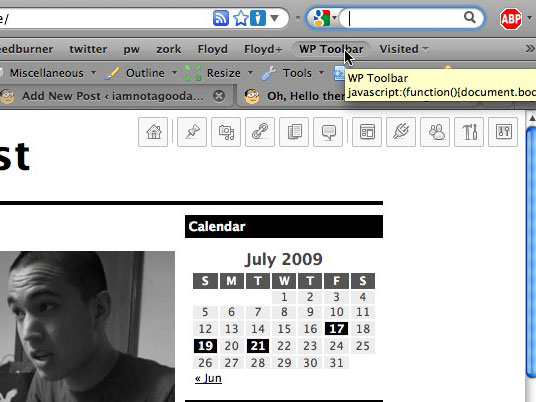
WordPress Admin Toolbar Bookmarklet

wptoolbar

Bookmark this and/or drag it into your bookmark toolbar:

WP Toolbar

What it is

A JavaScript bookmarklet for WordPress site administrators and designers.

What it does:

Using jQuery, it appends the default WordPress admin menu to whatever page you’re currently on and styles it with CSS, fixing it to the top right corner. Assuming you’re on a site that’s running WordPress (and it’s installed in the domain’s root), you now have instant access to the entire administrative back end (sans any pages from custom plugins, etc) from the front end.

To remove the the toolbar menu, just re-click the bookmarklet, ad infinitum.

What it doesn’t do

It does not give you access to anything you wouldn’t already have. If you use it on this site, for example, you’ll still have to log in. Also, if the site doesn’t run on WP, you’ll get a whole mess of 404s.

Made using the menu from the most recent WordPress release, 2.8. Tested with FireFox and Safari on Mac. Not tested with IE or Windows. Feedback appreciated.

Updates

GreaseMonkey script (3/3/10)

Hendrik from Germany has made a GreaseMonkey script that automatically loads my WP toolbar when on a specific site. Pretty cool.
http://www.kulturbolschewismus.de/2010/03/03/wordpress-admin-toolbar/
(or translated into English)

Support for folder’d WP and some CSS/JS fixes (3/19/10)

By popular request, I have now added support for WordPress installations not in the root folder. Here’s the bookmarklet for that:

FOLDERNAME WP Toolbar

After you’ve dragged it into your bookmarks toolbar, replace the two instances of FOLDERNAME with the name of your folder. Old bookmarklets without this new variable will continue to work.

I’ve also fixed some minor CSS positioning things and made it check for jQuery before loading it… so it should look nicer and be faster!

Safari Extension (6/19/10)

Dan Schointuch of Semimagic ported my bookmarklet into a native Safari extension. Pretty cool. Read his blog post or get the source on GitHub.

Firefox Add-On (11/20/10)

There’s now a full-fledged Firefox Add-on made by Baris Derin. Thanks, Baris!

94 Responses to WordPress Admin Toolbar Bookmarklet

Newer Comments →
  1. Pingback: CSS Brigit | WordPress Admin Toolbar Bookmarklet

  2. Anonymous says:

    Hooray! Hooray! Hooray! Beautiful and it works. Great combination! Is there a way to have the script access to the current page id so that when I click “Pages : edit” it takes me right to the editor for the page I’m on?

  3. tommy says:

    @ anon

    Thanks! No, there’s not really a consistent way to do that; WP themes can tag posts with the ID in any number of ways, if they even do at all. Good thought, though.

  4. Pingback: Bookmarklet to Quickly Access WordPress Admin Menu « Weblog Tools Collection

  5. Mr.JOSE says:

    Wow… its a great script buddy… Cant you add one more button like [hide] or [close] ?? It wud be a nice addition.. and as the 2nd commenter – Anonymous said cant you add the ability to post the content of the current site??

    Actually as you might know wordpress provides the script right? cant you just add it with a sleek new button?

    BTW, the post to blog script :

    javascript:var d=document,w=window,e=w.getSelection,k=d.getSelection,x=d.selection,s=(e?e():(k)?k():(x?x.createRange().text:0)),f='http://www.josephilipraja.com/myworld/wp-admin/press-this.php',l=d.location,e=encodeURIComponent,u=f+'?u='+e(l.href)+'&t='+e(d.title)+'&s='+e(s)+'&v=4';a=function(){if(!w.open(u,'t','toolbar=0,resizable=1,scrollbars=1,status=1,width=720,height=570'))l.href=u;};if (/Firefox/.test(navigator.userAgent)) setTimeout(a, 0); else a();void(0)

  6. Mr.JOSE says:

    Oops.. am sorry…. I mis understood the script!… I thought its a toolbar that would work with all the sites.. my mistake… sorry.. ;) :P

    Anyway this one is another great idea… cool.. I like it.. :D

  7. SD says:

    Excellent idea / implemenation.

    One thing is that many WP sites already have jQuery loaded up, so make the googleapi loading of jQuery conditional ?

    :)

  8. Anuncios Google says:

    That´s a really good idea!!! Greets, partner, I ´ll test in IE and I´ll tell you if its works allright or not.
    I usually make all my new sites for best results at Google SERPs with WordPress and I think that your bookmarklet its really useful for this objetive.
    Thanks a lot and see you soon!!!

    PD: Sorry about my poor english, I´m from Spain and my grammar is a little bit rusty ;-)

  9. Pingback: Hasznos bookmarklet Wordpress-fanoknak | Ráktalicska

  10. tommy says:

    @ Mr.JOSE
    To hide the toolbar, just reclick the bookmarklet. I’ll make that a little clearer in the blog post. (I think you figured out that your other suggestion couldn’t really apply to this bookmarklet, but thanks for the advice.)

    @ SD
    That’s actually a good suggestion. Maybe for the next version, eh?

    @ jochen
    That functionality would require custom values for each individual circumstance, thus no support for it. Feel free to take a look at the JS/CSS (you can find it if you look for it) and make/host your own version.

  11. KL says:

    This looks like basically the most awesome thing ever. Anyone try this in Google Chrome for a mac? I’ve been phasing out safari, too slow.

  12. Pingback: Bookmarklet to Quickly Access WordPress Admin Menu | Son Of Byte - Web Design & Development

  13. knowlimit says:

    What if the WP blog is in a subdomain (mysite.com/blog/)?

    Doesn’t seem to work; since it keep trying to access the top-level.

  14. Pingback: BlogPremiere » Blog Archive » Wordpress Admin Menu Bookmarklet

  15. Joost de Valk says:

    Why I only found this today, I don’t know, but suffice to say that you’ve already earned a spot in my heart. I’ve also included this bookmarklet in Quix‘s default command set, under the command ‘wptool’ :)

  16. Geoff Snyder says:

    What a neat little tool. I have just started using this for my leadership and team collaboration blog and have found it to be a big help. I am currently using WordPress 2.9.2 and it works with seamlessly. Thanks again!

  17. Pingback: WordPress控制面板书签插件 « Wordpress插件

  18. Pingback: WordPress Toolbar im Browser

  19. Pingback: links for 2010-03-03

  20. Pingback: WP Toolbar (Tip of the Day #0022) | WordPressOfTheday.com

  21. Pingback: Worpress araç çubuğu kısayolları | tuguts.com

  22. Pingback: وردپرسی دلپذیرتر با Admin Toolbar Bookmarklet « Silvercover’s Weblog

  23. Pingback: links for 2010-03-09 « 個人的な雑記

  24. Pingback: Bookmarklet to Quickly Access WordPress Admin Menu | pro2go Designs Blog

  25. Dalton says:

    It’s too bad this tool doesn’t work with sites that aren’t installed in the root – all of my sites are installed in a subdirectory. It looks like a really cool function.

  26. Jim says:

    I agree that it need’s an other-than-Root option.

    How a quick “ask” window:

    WordPress Directory:
    __ Root
    __ Other: __________
    Submit

  27. Jim says:

    Also easy to add to (for example) a footer with something like:

    <?php
    if ( is_user_logged_in() ) {
    echo '<a href=”//yourdomain.com/location/wptoolbar.js\’;})();” rel=”nofollow”>WP Toolbar</a>’;
    };
    ?>

    Assuming you’ve grabbed the JS, CSS and graphics, of course.

    Must be a way to make a plugin to do all this. Says the guy who has never made a plugin OR learned JQuery.

    Maybe it’s time to start.

  28. tommy says:

    @ Jim
    Fixed that link code. (You wanted to use HTML entities instead of < and >!)

    As for that plugin, everyone, feel free to have at it. Check the bookmarklet’s link for the proper loading JS and follow its URL to grab the JS itself.

  29. tommy says:

    @ jochen, knowlimit, Dalton, Jim, Travis Quinnelly
    Support for folders added!

    @ SD
    It’s conditional now!

    Thanks for all the support and suggestions, guys and gals.

  30. Pingback: G Focus » WordPress 快捷管理工具条:WordPress Admin Toolbar Bookmarklet

  31. Pingback: .::ich-wars-nicht.ch::. » Webdev Links 3 – Wordpress

  32. Bill says:

    Would you consider augmenting this so that it works with WPMU (subdirectory install)? Currently, the bookmarklet always shows the main blog menu. It would be nice if it could know if the person is looking at a sub-blog and show its menu. I think this would mean changing the links from /wp-admin/… to something else.

  33. Bill says:

    The FOLDERNAME bookmarklet helps… but it would be cool if the bookmarklet could work with a dynamic foldername, and set it automatically.

  34. Pingback: Quix Help – Quix « yugenro

  35. Pingback: WordPres Admin Bar – Wordpress Toolbar : Tutoriale Wordpress

  36. Ian says:

    Thank you, Tommy, for the great tool. I’ve updated the code to work for WordPress MU and presumably the way multi-platform WordPress 3.0 will work as well. It assumes you’re working on the following directory structure: http://www.domain.com/subblog/path/to/more

    Just minify below for the bookmarklet:

    javascript:(function(){
    var a=document.location.href;
    var b=’http://wptoolbar.iamnotagoodartist.com/wptoolbar.js’;
    var c=a.replace(/^http:\/\/[^\/]+(\/(\w+))\/.*$/,’$2′);
    if (c!=a) {b+=’?f=’+c;}
    document.body.appendChild(document.createElement(‘script’)).src=b;
    })();

Newer Comments →

Leave a Reply

Your email address will not be published.

You may use these HTML tags and attributes: <a href="" title=""> <abbr title=""> <acronym title=""> <b> <blockquote cite=""> <cite> <code> <del datetime=""> <em> <i> <q cite=""> <strike> <strong>